Ask a large language model (LLM) about your company's holiday allowance and it will answer confidently. It will also be wrong, because it has never seen your handbook.
LLMs know only what was in their training data. They don't know your internal documents, last week's product update, or anything published after their cutoff date. When they don't know, they often guess, and a fluent guess is easy to mistake for a fact.
Retrieval-Augmented Generation (RAG) fixes this without retraining the model. In this post we'll cover what RAG is, how it works, and then build a small working RAG system in about 60 lines of Python.
What is RAG?
RAG means looking up relevant information first, then handing it to the LLM along with the question. The model answers from the material you gave it instead of from memory alone.
Think of it as turning a closed-book exam into an open-book one. The student (the LLM) is just as smart as before. The difference is that they can now flip to the right page before answering.
The name spells out the three steps:
- Retrieval: find the pieces of your documents most relevant to the question.
- Augmented: add those pieces to the prompt as context.
- Generation: the LLM writes an answer grounded in that context.
This gives you three big wins. Answers can use private or up-to-date data. You can cite which document an answer came from. And updating the system's knowledge is as simple as adding a file, with no model training involved.
How RAG works
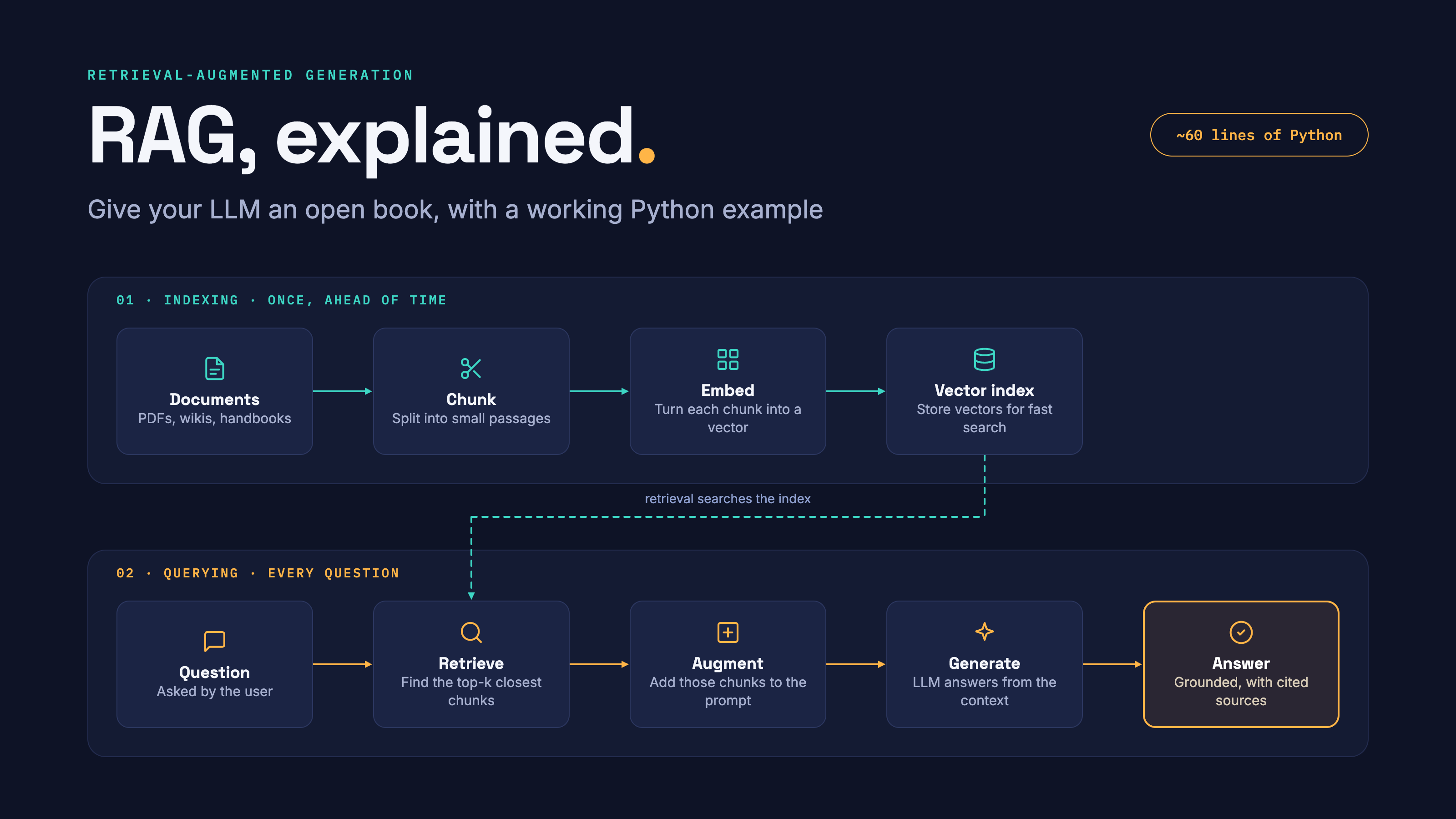
A RAG system has two pipelines. The first prepares your documents once, ahead of time. The second runs every time someone asks a question.
Indexing splits documents into chunks, converts each chunk into a vector (a list of numbers that captures its content), and stores the vectors in an index. Querying converts the question into a vector the same way, finds the closest chunks, adds them to the prompt and lets the LLM write the answer.
The LLM itself never changes. All new knowledge arrives through the prompt, which is why updating a RAG system is as cheap as re-indexing a document.
Let's build one: an HR handbook assistant
Our example answers employee questions about a fictional company, using its HR handbook. The LLM has never seen this handbook, so without RAG it can only guess.
To keep it small and runnable, we'll use TF-IDF from scikit-learn for retrieval. It needs no downloads or API keys. For generation we'll call Claude through the Anthropic Python SDK, but any chat LLM works the same way.
Install the two libraries first:
pip install scikit-learn anthropic
Step 1: The knowledge base
In a real system these chunks come from splitting your PDFs, wiki pages or tickets. Here we write six short chunks by hand, each with an id so answers can cite it.
documents = [
    {"id": "leave-01", "text": "Full-time employees in company get 28 days of paid holiday per year, including bank holidays."},
    {"id": "leave-02", "text": "Unused holiday days can be carried over to the next year, up to a maximum of 5 days."},
    {"id": "remote-01", "text": "Employees may work remotely up to 3 days per week with their manager's approval."},
    {"id": "expense-01", "text": "Travel expenses must be submitted within 30 days with receipts attached."},
    {"id": "expense-02", "text": "Meal expenses during business travel are reimbursed up to 40 pounds per day."},
    {"id": "it-01", "text": "Lost or stolen laptops must be reported to the IT helpdesk within 24 hours."},
]
Step 2: Index the documents
We turn every chunk into a vector of numbers. TF-IDF scores each word by how distinctive it is, so "carried" and "holiday" count for more than common words.
from sklearn.feature_extraction.text import TfidfVectorizer
from sklearn.metrics.pairwise import cosine_similarity

vectorizer = TfidfVectorizer(stop_words="english")
doc_vectors = vectorizer.fit_transform([d["text"] for d in documents])
Step 3: Retrieve the most relevant chunks
The question is turned into a vector the same way. Cosine similarity then scores how close it is to each chunk, and we keep the top k.
def retrieve(question, k=2):
    q_vector = vectorizer.transform([question])
    scores = cosine_similarity(q_vector, doc_vectors)[0]
    ranked = scores.argsort()[::-1][:k]
    return [(documents[i], round(float(scores[i]), 3)) for i in ranked]
Step 4: Augment the prompt
We paste the retrieved chunks into the prompt. The instructions matter: we tell the model to answer only from the context, cite its source, and admit when it doesn't know.
def build_prompt(question, hits):
    context = "\n".join(f"[{d['id']}] {d['text']}" for d, _ in hits)
    return (
        "Answer the question using ONLY the context below. "
        "Cite the source id in brackets. If the answer is not in the context, say you don't know.\n\n"
        f"Context:\n{context}\n\nQuestion: {question}"
    )
Step 5: Generate the answer
Finally, we send the augmented prompt to the LLM. Set the ANTHROPIC_API_KEY environment variable before running this step.
import anthropic

client = anthropic.Anthropic()  # reads ANTHROPIC_API_KEY

def answer(question):
    hits = retrieve(question)
    response = client.messages.create(
        model="claude-sonnet-5-5",
        max_tokens=300,
        messages=[{"role": "user", "content": build_prompt(question, hits)}],
    )
    return response.content[0].text

print(answer("How many holiday days can I carry over to next year?"))
What happens when you run it
For the question "How many holiday days can I carry over to next year?", retrieval returns these two chunks (real output from the code above):
| Rank | Chunk id | Similarity score |
|---|---|---|
| 1 | leave-02 | 0.656 |
| 2 | leave-01 | 0.426 |
The carry-over rule ranks first, and the general holiday allowance comes second as useful extra context. The expenses, remote-work and IT chunks score zero and are left out.
The LLM then replies with something like this (exact wording varies between runs):
You can carry over up to 5 unused holiday days to the next year [leave-02].
The answer is correct, it is specific to company, and it tells the reader exactly where it came from. Ask "What is the company's parental leave policy?" instead, and every chunk scores 0. The model receives unrelated context (a laptop rule and a meal allowance), so a well-instructed model replies that the handbook doesn't say. In production you'd also drop chunks below a minimum score. Either way, "I don't know" is a feature: it is the model not making things up.
From toy to production
The five steps stay the same at scale; what changes is how well each one is done. These are the upgrades that matter most.
| Component | Toy version (above) | Production version |
|---|---|---|
| Chunking | Six hand-written sentences | Split documents into chunks of a few hundred tokens with some overlap, keeping headings attached |
| Embeddings | TF-IDF (word matching) | A neural embedding model, which matches meaning: "time off" finds "holiday" |
| Storage | A list in memory | A vector database or a vector index in an existing database (e.g. pgvector for Postgres) |
| Search | Similarity only | Hybrid search: keyword (BM25) plus vector, then merge the results |
| Ranking | Top 2 by score | Retrieve 20 to 50 candidates, then a reranker model picks the best few |
| Filtering | None | Minimum score threshold, plus metadata filters such as department, date or access rights |
Why semantic embeddings matter. TF-IDF only matches words that appear in both texts. Ask our toy system "How much annual leave do I get?" and it struggles, because the handbook says "holiday", not "annual leave". An embedding model places both phrases close together because they mean the same thing.
Measure before you tune. Write 30 to 50 real questions with known answers. For each, check two things separately: did retrieval find the right chunk, and did the model answer correctly from it? Most RAG failures turn out to be retrieval failures, and you can't fix what you haven't measured.
Common pitfalls, and when not to use RAG
RAG is not magic. These are the mistakes that trip up most first projects:
- Bad chunks. A chunk that splits a rule in half, or loses the heading that gives it meaning, can't be retrieved properly. Look at your chunks before blaming the model.
- Too much context. Stuffing 30 chunks into the prompt buries the right one in noise. A few highly relevant chunks beat many loosely relevant ones.
- Stale or conflicting documents. If the index holds both the 2024 and 2026 policy, the model may quote either. Remove old versions or filter by date.
- No "I don't know" path. Without an explicit instruction, the model may fill gaps with plausible guesses even when the context is empty.
- Ignoring permissions. If retrieval can see every document, so can every user. Filter chunks by what the person asking is allowed to read.
RAG is also the wrong tool for some jobs. If your knowledge fits comfortably in the prompt (a two-page FAQ), just include all of it. If you need to change the model's style or behaviour rather than its knowledge, prompting or fine-tuning fits better. And if the question needs live data, such as today's stock level, call an API or database directly instead of searching documents.
Wrapping up
RAG gives an LLM an open book: retrieve the relevant pages, add them to the prompt, and let the model answer from them. That one idea makes answers current, private-data aware and traceable to a source, all without retraining.
Our 60-line handbook assistant shows the whole pattern. To take it further, try these next steps:
- Load a real document (a PDF or a folder of Markdown files) and split it into chunks.
- Swap TF-IDF for a neural embedding model and compare results on the "annual leave" question.
- Add a minimum similarity score so off-topic questions get a clean "I don't know".
- Write 20 test questions and track how often the right chunk is retrieved.
Start small, measure retrieval, and improve one step at a time.

No comments yet
Be the first reader to add one.